View page in desktop
|
Report error
  •   Apple app store icon
  • Google play store icon
Terms of Service
|
Privacy Policy
|
PDPA
|
Site Map
©2004-2026 Sgcarmart, Singapore. All rights reserved.
  • Home
  • Car Articles
  • advice
  • advice Listings
  • Car Ownership Advice
  • Which OBU app should you get?

    28 Jun 2024

    |

    41,424 views

    Don't want the display unit that comes with the new OBU system and ERP 2.0? There's three apps that you can use instead, but just which one is best?

    We get it. The OBU display isn't the most pleasant thing to look at and you'd rather not have it interrupt the beautiful design of your car's dashboard or obstructing the visibility out of your windscreen.

    But of course, you also want to be able to easily keep track of just how much is left in your CEPAS card, or maybe even still want to receive those handy traffic updates and speed trap warnings that the new system offers. So, you've decided to get one of the OBU mobile apps available. But just which one should you choose?

    To help you decide, we've taken a car out to assess three of the apps offered to see just is best for you!
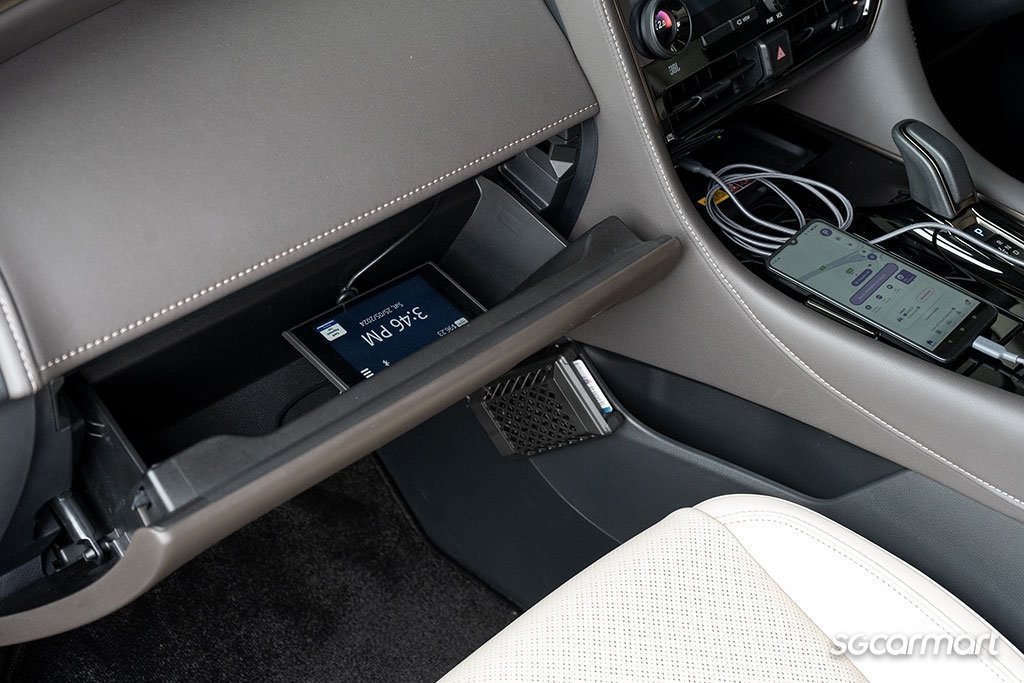
    With these apps, you won't need to install the display unit of the new OBU system

    First things first…

    Unlike most apps out there, these three won't work with your OBU processing unit right out of the Apple App store or Google Play store.

    You'll first need to register your phone's Bluetooth MAC address via the OneMotoring eServices page (available here), before your new OBU processing unit will pair with phone via Bluetooth. For those who need more assistance on finding your phone's Bluetooth MAC address and entering this information into the OneMotoring eServices page, a step-by-step guide is available via OneMotoring here (for users of Android phones) or here (for users of Apple phones).

    Once all this is setup you should have no issue running these apps. Of course, make sure your Bluetooth and location service is turned on when you're setting off!

    Now let's get to those apps, shall we?
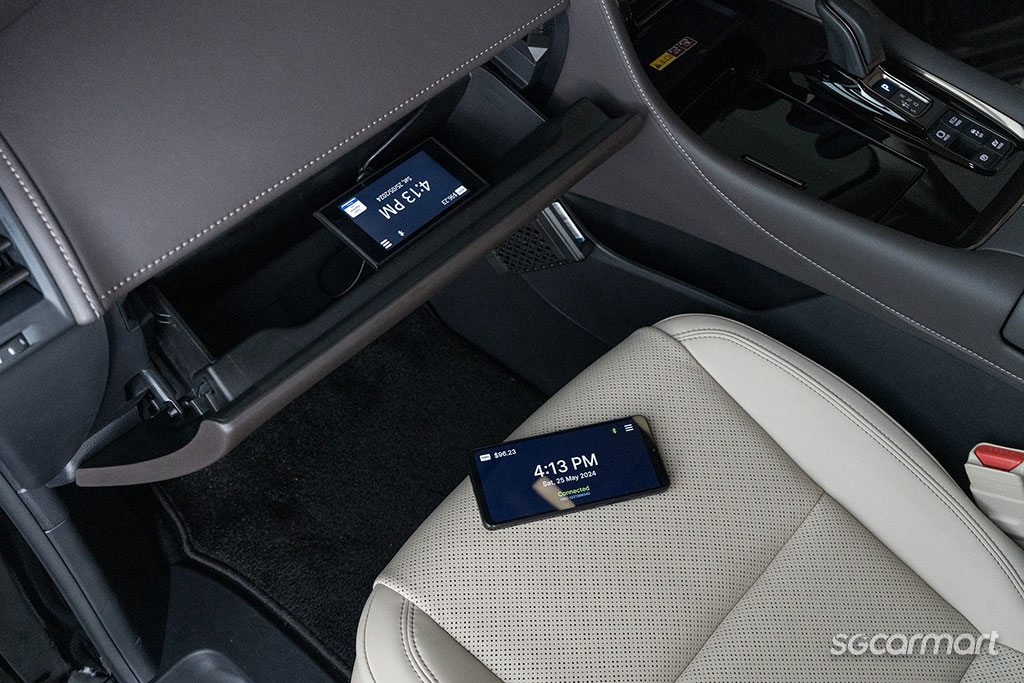
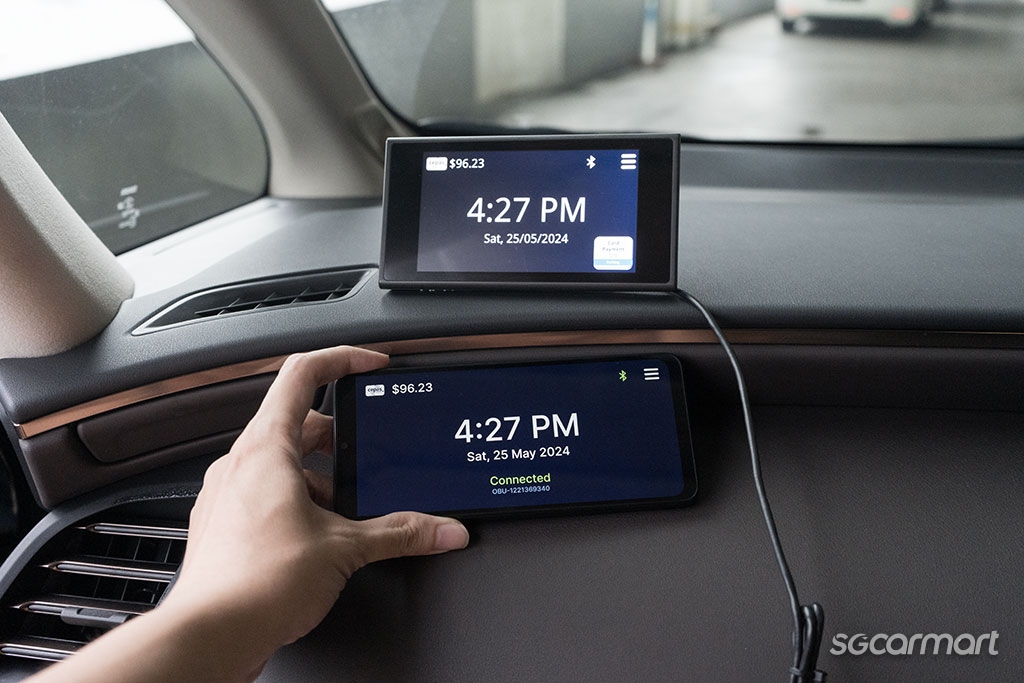
    The ERP 2.0 app is designed to simply mirror what is shown on the display unit of the new OBU on your smartphone

    ERP 2.0 - For the minimalist

    Kicking things off is the Land Transport Authority's very own ERP 2.0. With a rating of 1.4 out of five (from a total of 11 reviews, although this especially low rating is no doubt a product of the general dissatisfaction over the new OBU) on the Google Play store, ERP 2.0 simply emulates the display unit of the OBU.

    And it does its job competently. The typical school zone/ERP deduction/Speed camera zone warnings were delivered right on cue via this app. And the app makes it clear exactly how much value is left within your CEPAS card. It offers a minimalist display that places only what information you need from the display unit of the new OBU system on your phone.
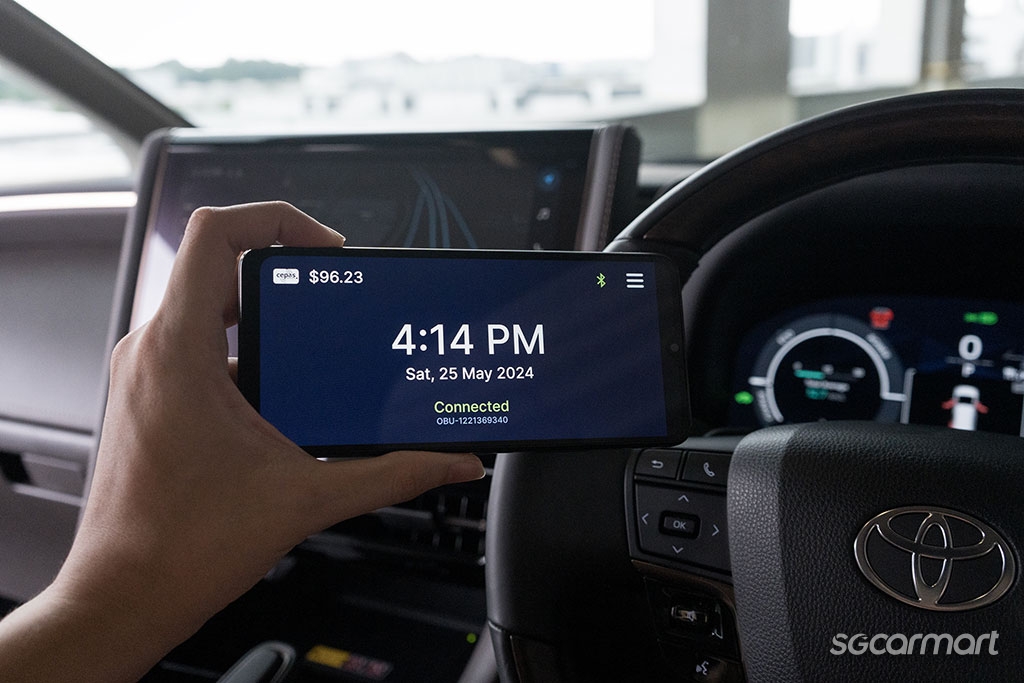
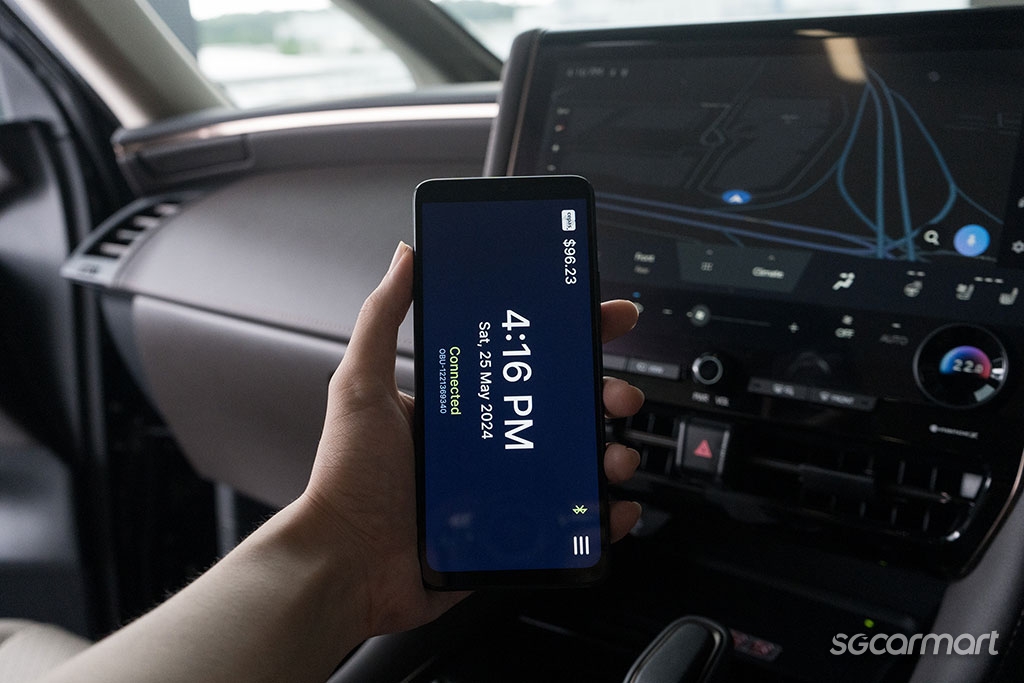
    The ERP 2.0 app does not work in portrait mode so you'll might want to get used to operating Google Maps in its horizontal mode

    Dig deeper and plenty of usability quickly bubbles to the surface. Like the other two apps assessed here, the ERP 2.0 app does not come with a button to allow you to temporarily deactivate your CEPAS card for parking payment, so if you've got a complimentary parking ticket, you're going to have to reach over to remove your card from the processing unit (do note that none of the apps assessed here currently have this capability).

    But there's one more interesting oversight regarding the ERP 2.0 app: It only operates in a landscape orientation. So, motorists looking to utilise this app alongside, for example, Google Maps and are more accustomed to navigating with Maps in its portrait layout will need to get familiar with navigating its its landscape layout, or get used to reading sideways to check how much is still left on their CEPAS card.

    Conclusion: Download ERP 2.0 if you'd rather not install the display unit of OBU 2.0, but still want to receive those handy notifications about bus lanes and speed cameras. But there is a better option available below.

    ERP 2.0 is available on the Google Play app store here, and on the Apple App Store here.
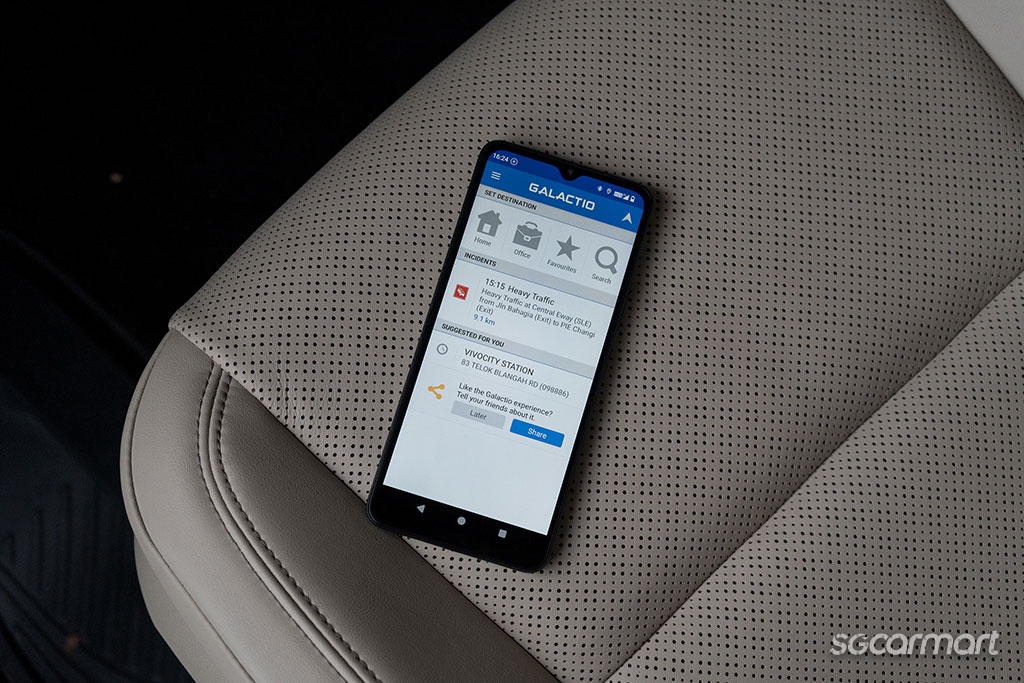
    Galactio is great for those who need to know if there's congestion or road works on their journey

    Galactio - For those who hate traffic congestion

    Unlike the ERP 2.0 app, Galactio is first and foremost a navigation app, but also now comes with the ability to pair with your OBU unit. The app is rated 3.8 out of five (from a total of 954 reviews) on the Google Play store.

    Pair this app with your OBU system and you'll still need to head into the menu and hit the option to load up the 'Nexgen ERP' display to see what value is stored within your CEPAS card.
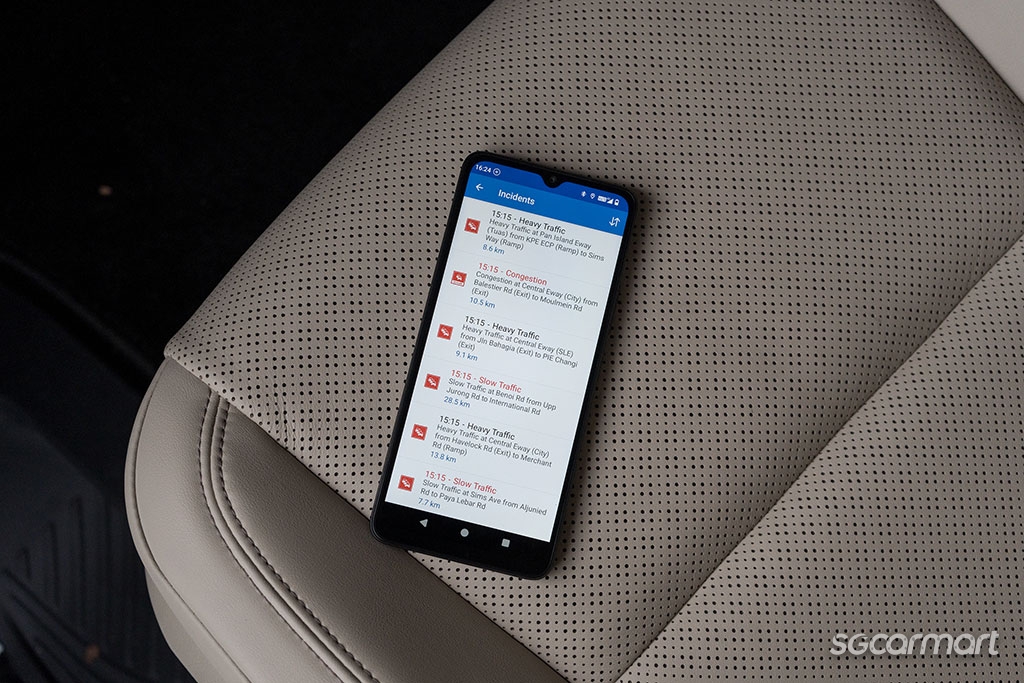
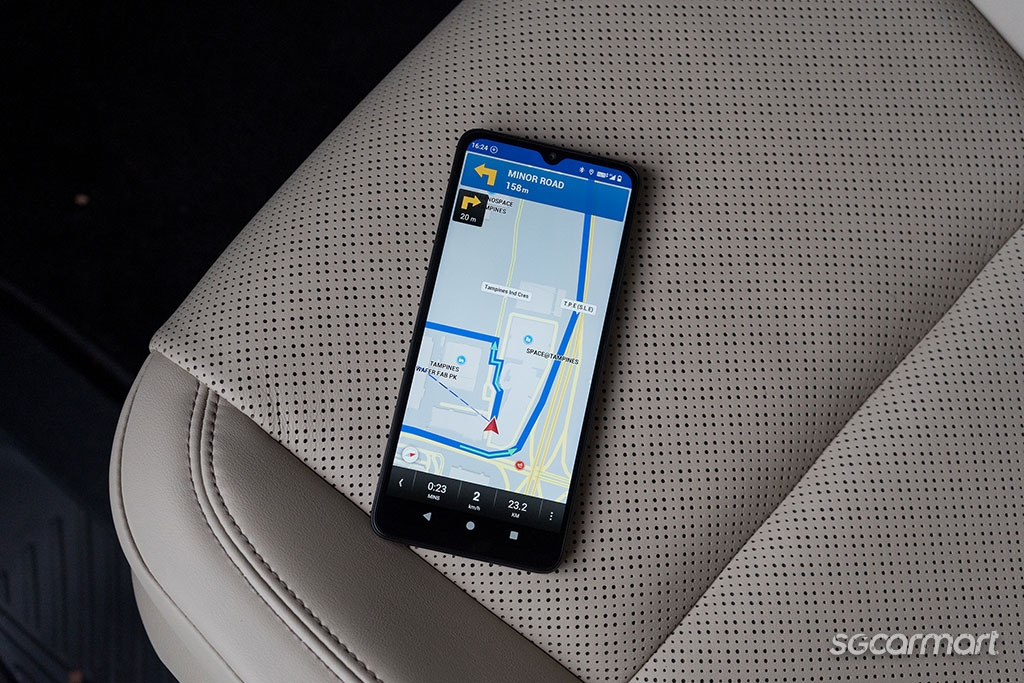
    Galactio gives a comprehensive list of traffic issues around the island, and doubles as a competent navigation app, but its interface is outright dated

    Assessed as a navigation app, however, Galactio proves impressive. Its user interface is unquestionably dated, but loading speeds here are fast (it's worth noting that the map that Galactio utilises is pre-downloaded) even on my bargain priced Xiaomi A3, and the app gives you plenty of warnings about potential delays to your journey, whether it be due to traffic accidents or just heavy traffic, as well as the typical hazards motorists like to be warned about including speed traps and red light cameras.

    Conclusion: Galactio is great for those who want both a navigation tool and something that can keep track of the value in their CEPAS card all within one app. But it misses the real-time traffic condition warnings that Waze offers, or the ability to check reviews and the opening hours of venues that Google Maps offers.

    Galactio is available on the Google Play app store here, and on the Apple App Store here.
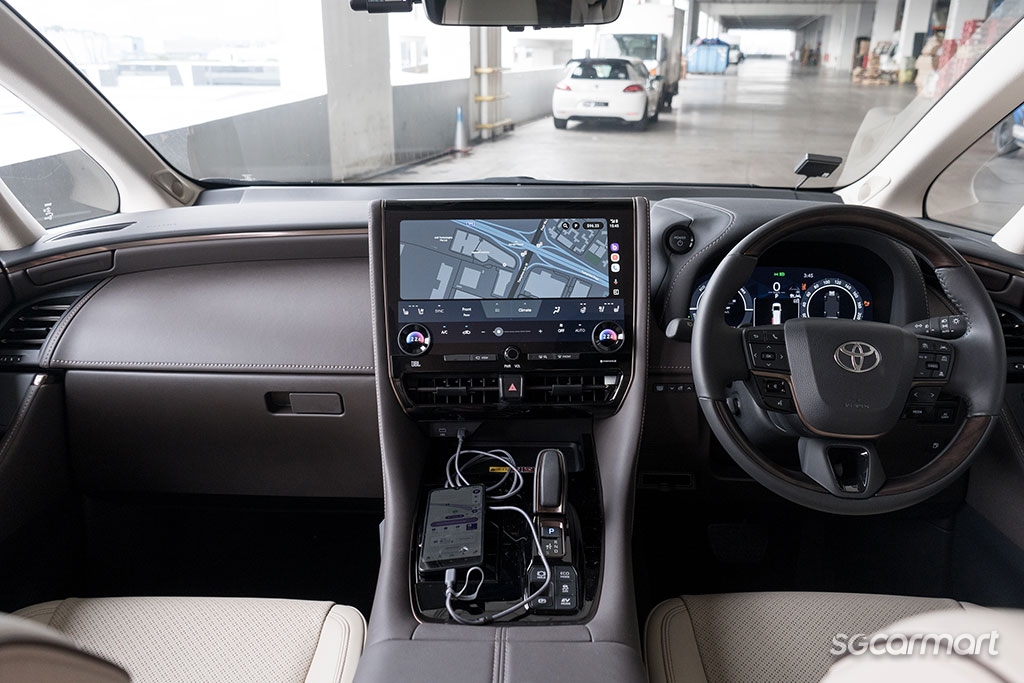
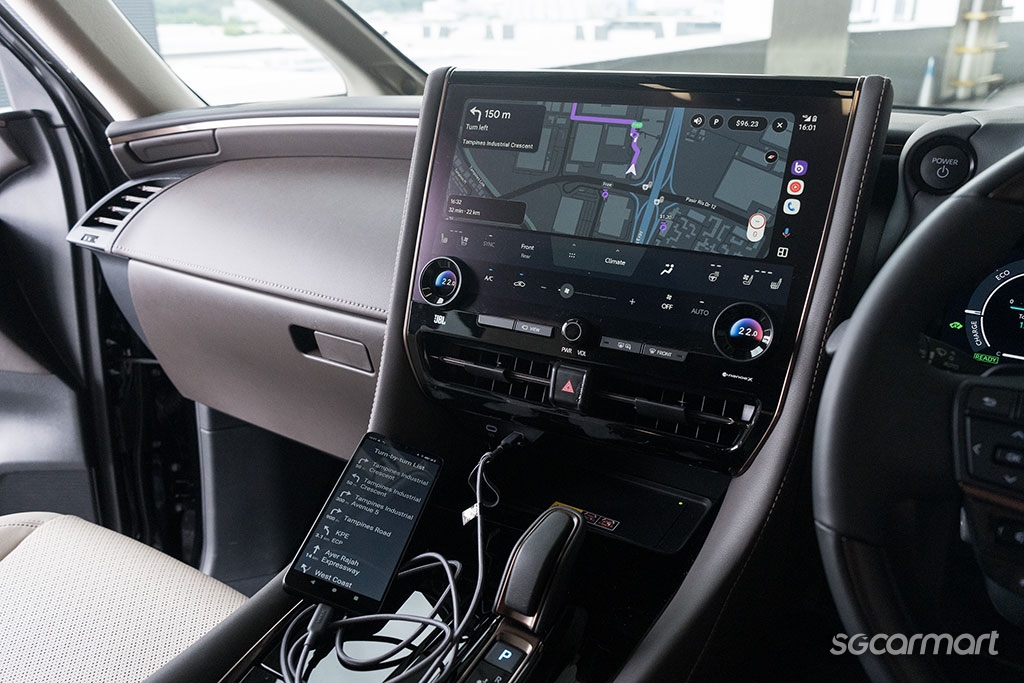
    Ignore the cables - if your car comes with wireless Apple CarPlay and Android Auto, you'll be able to mirror Breeze on your infotainment screen without any wires cluttering your cabin

    Breeze - Do it all app, and then some

    Where do I even start. For those who want a trouble-free commuting experience, Breeze should be the go-to. The app is rated at 3.1 stars out of five on the Google Play store (from a total of 110 reviews).

    Forget bothering with the display unit of the new OBU - Breeze is the only app here that is compatible with both Android Auto and Apple CarPlay. So, if the car you own can pair with your smartphone via wireless Android Auto and Apple CarPlay, you'll be able to rely simply on the infotainment display already present in your car to get all the notifications that the OBU system can deliver, and of course, keep track of how much is currently in your CEPAS card.

    But Breeze offers so much more than the opportunity to keep your car's windscreen unobstructed.
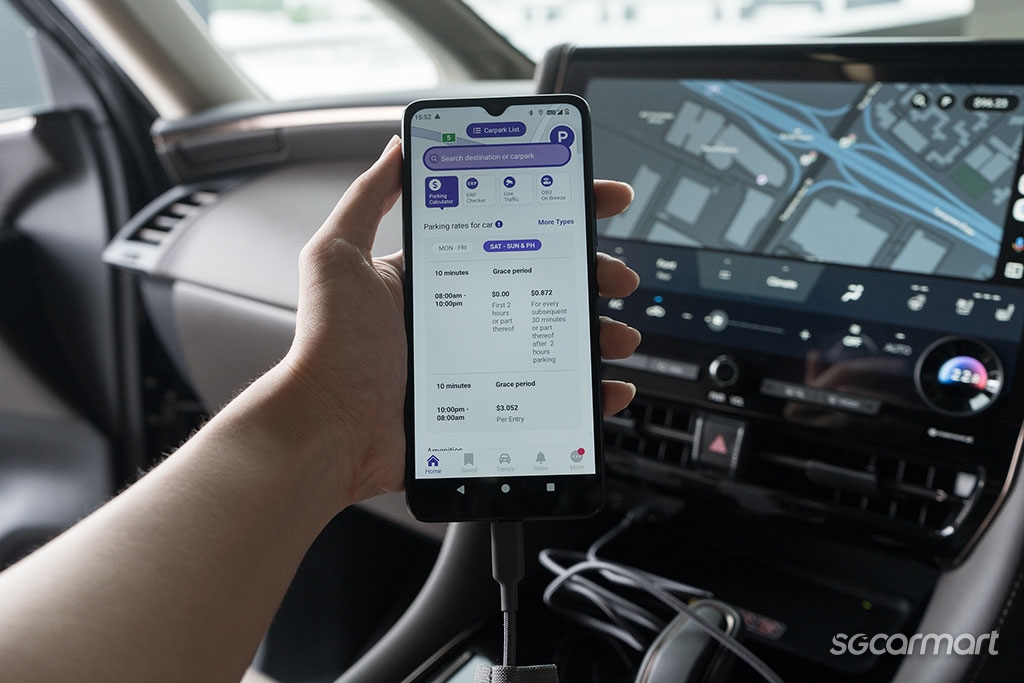
    With Breeze, you can not only check parking prices around your destination, but can also snoop out just how much traffic there is along the way from Singapore's traffic cameras (images of Woodlands Causeway are also available)

    For those not so great at navigating our streets, not only does Breeze offer directions, but can also advise on the availability of parking lots at your entered destination, on top of information on pricing for the lot. And should you find any of these unfavourable, the app will even automatically draw up alternative parking locations, so you always know what your best next options are.

    Even if you're planning a trip in advance, the Breeze app still has plenty to offer.

    You can check if there are any ERP payments that you'll incur on a given route next week via the app, for example. And for those who frequently drive over the causeway, the app also offers cctv footage of traffic conditions at both the first and second link into Malaysia, on top of footage across a host of our island's expressways.

    And you'll be able to look forward to much more besides with the breeze app as well.

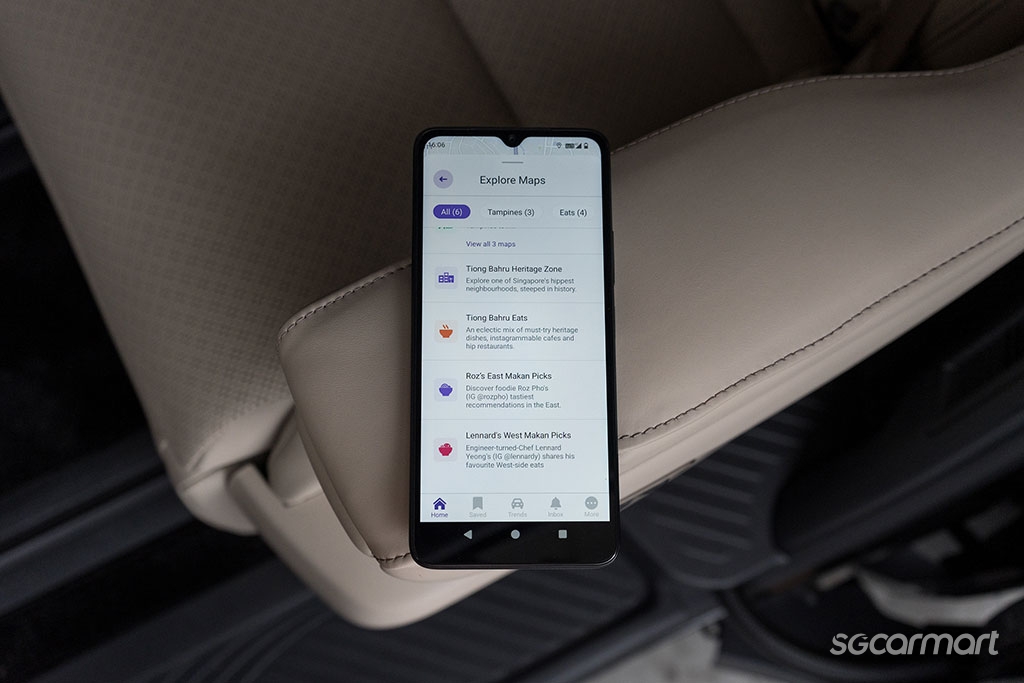
    Navigating with the Breeze app is as easy as Google Maps, and the developers at Breeze plan to add in more features, so in the future you will be able to find new food options or places of interest at different districts, for example

    First off, parking vouchers are already offered in the app, which can be redeemed all via the app itself even before you leave your home. What these means is that you won't even need to disable your CEPAS card when you drive out of the parking lot from which you’ve activated the voucher for - any discounts you have will automatically be applied as the parking gantry will already know which OBU identification number to look out for. 

    The developers of the app state that this system could be used in the future to offer dynamic management of the preferred parking location of drivers, so looking for a spot to park up when a popular concert swings into town or when there's large events downtown could become easier in the future.

    And beyond the world of motoring, the app is also working to integrate alternative maps so, for example, users could explore possible food options within a certain region.

    Conclusion: It's currently the best alternative to the OBU display out there, whether you intend to just utilise its navigation features and keep receiving those OBU alerts, or to make use of its vast data of parking prices. Furthermore, it is the only app that doesn't even require you to have a smartphone holder in your car.

    Breeze is available on the Google Play app store here, and on the Apple App Store here.

    Which app will you get?

    Which app to download?

    Don't want to install the display unit of the new OBU system in your car? For those who would rather simply use their smartphone to stream the same display of the unit onto their phone, the LTA ERP 2.0 app is competent. But I'd expect most would rather have Google Maps or Waze running at the foreground of their smartphones, so the ERP 2.0 app only has any worth when it comes to offering warnings about bus lane operation times and speed traps.

    And likewise for the Galactio app. Sign up for automatic top-ups of your CEPAS card and you'll be infinitely better off using Google Maps or Waze to navigate around Singapore.

    Which brings us neatly over to Breeze. With a competent in-built navigation system alongside a suite of features that makes it an appealing option even next to Waze and Google Maps, it's currently the most appealing option of the three here.

    Clarence Seow
    Story by Clarence Seow
    A true epicurean, he has three pleasures: Good food, good sleep, and, of course, fun cars.
    24.4k

    Tags

    new car buying and owning guide obu on board unit erp erp 2.0 obu display unit obu app erp 2.0 app cashcard cepas card

    AllReviewsNewsAdviceFeaturesVideos
    • Home
    • Car Articles
    • advice
    • advice Listings
    • Car Ownership Advice

    Which OBU app should you get?

    28 Jun 2024

    |

    41,424 views

    Don't want the display unit that comes with the new OBU system and ERP 2.0? There's three apps that you can use instead, but just which one is best?

    We get it. The OBU display isn't the most pleasant thing to look at and you'd rather not have it interrupt the beautiful design of your car's dashboard or obstructing the visibility out of your windscreen.

    But of course, you also want to be able to easily keep track of just how much is left in your CEPAS card, or maybe even still want to receive those handy traffic updates and speed trap warnings that the new system offers. So, you've decided to get one of the OBU mobile apps available. But just which one should you choose?

    To help you decide, we've taken a car out to assess three of the apps offered to see just is best for you!

    With these apps, you won't need to install the display unit of the new OBU system

    First things first…

    Unlike most apps out there, these three won't work with your OBU processing unit right out of the Apple App store or Google Play store.

    You'll first need to register your phone's Bluetooth MAC address via the OneMotoring eServices page (available here), before your new OBU processing unit will pair with phone via Bluetooth. For those who need more assistance on finding your phone's Bluetooth MAC address and entering this information into the OneMotoring eServices page, a step-by-step guide is available via OneMotoring here (for users of Android phones) or here (for users of Apple phones).

    Once all this is setup you should have no issue running these apps. Of course, make sure your Bluetooth and location service is turned on when you're setting off!

    Now let's get to those apps, shall we?

    The ERP 2.0 app is designed to simply mirror what is shown on the display unit of the new OBU on your smartphone

    ERP 2.0 - For the minimalist

    Kicking things off is the Land Transport Authority's very own ERP 2.0. With a rating of 1.4 out of five (from a total of 11 reviews, although this especially low rating is no doubt a product of the general dissatisfaction over the new OBU) on the Google Play store, ERP 2.0 simply emulates the display unit of the OBU.

    And it does its job competently. The typical school zone/ERP deduction/Speed camera zone warnings were delivered right on cue via this app. And the app makes it clear exactly how much value is left within your CEPAS card. It offers a minimalist display that places only what information you need from the display unit of the new OBU system on your phone.

    The ERP 2.0 app does not work in portrait mode so you'll might want to get used to operating Google Maps in its horizontal mode

    Dig deeper and plenty of usability quickly bubbles to the surface. Like the other two apps assessed here, the ERP 2.0 app does not come with a button to allow you to temporarily deactivate your CEPAS card for parking payment, so if you've got a complimentary parking ticket, you're going to have to reach over to remove your card from the processing unit (do note that none of the apps assessed here currently have this capability).

    But there's one more interesting oversight regarding the ERP 2.0 app: It only operates in a landscape orientation. So, motorists looking to utilise this app alongside, for example, Google Maps and are more accustomed to navigating with Maps in its portrait layout will need to get familiar with navigating its its landscape layout, or get used to reading sideways to check how much is still left on their CEPAS card.

    Conclusion: Download ERP 2.0 if you'd rather not install the display unit of OBU 2.0, but still want to receive those handy notifications about bus lanes and speed cameras. But there is a better option available below.

    ERP 2.0 is available on the Google Play app store here, and on the Apple App Store here.

    Galactio is great for those who need to know if there's congestion or road works on their journey

    Galactio - For those who hate traffic congestion

    Unlike the ERP 2.0 app, Galactio is first and foremost a navigation app, but also now comes with the ability to pair with your OBU unit. The app is rated 3.8 out of five (from a total of 954 reviews) on the Google Play store.

    Pair this app with your OBU system and you'll still need to head into the menu and hit the option to load up the 'Nexgen ERP' display to see what value is stored within your CEPAS card.

    Galactio gives a comprehensive list of traffic issues around the island, and doubles as a competent navigation app, but its interface is outright dated

    Assessed as a navigation app, however, Galactio proves impressive. Its user interface is unquestionably dated, but loading speeds here are fast (it's worth noting that the map that Galactio utilises is pre-downloaded) even on my bargain priced Xiaomi A3, and the app gives you plenty of warnings about potential delays to your journey, whether it be due to traffic accidents or just heavy traffic, as well as the typical hazards motorists like to be warned about including speed traps and red light cameras.

    Conclusion: Galactio is great for those who want both a navigation tool and something that can keep track of the value in their CEPAS card all within one app. But it misses the real-time traffic condition warnings that Waze offers, or the ability to check reviews and the opening hours of venues that Google Maps offers.

    Galactio is available on the Google Play app store here, and on the Apple App Store here.

    Ignore the cables - if your car comes with wireless Apple CarPlay and Android Auto, you'll be able to mirror Breeze on your infotainment screen without any wires cluttering your cabin

    Breeze - Do it all app, and then some

    Where do I even start. For those who want a trouble-free commuting experience, Breeze should be the go-to. The app is rated at 3.1 stars out of five on the Google Play store (from a total of 110 reviews).

    Forget bothering with the display unit of the new OBU - Breeze is the only app here that is compatible with both Android Auto and Apple CarPlay. So, if the car you own can pair with your smartphone via wireless Android Auto and Apple CarPlay, you'll be able to rely simply on the infotainment display already present in your car to get all the notifications that the OBU system can deliver, and of course, keep track of how much is currently in your CEPAS card.

    But Breeze offers so much more than the opportunity to keep your car's windscreen unobstructed.
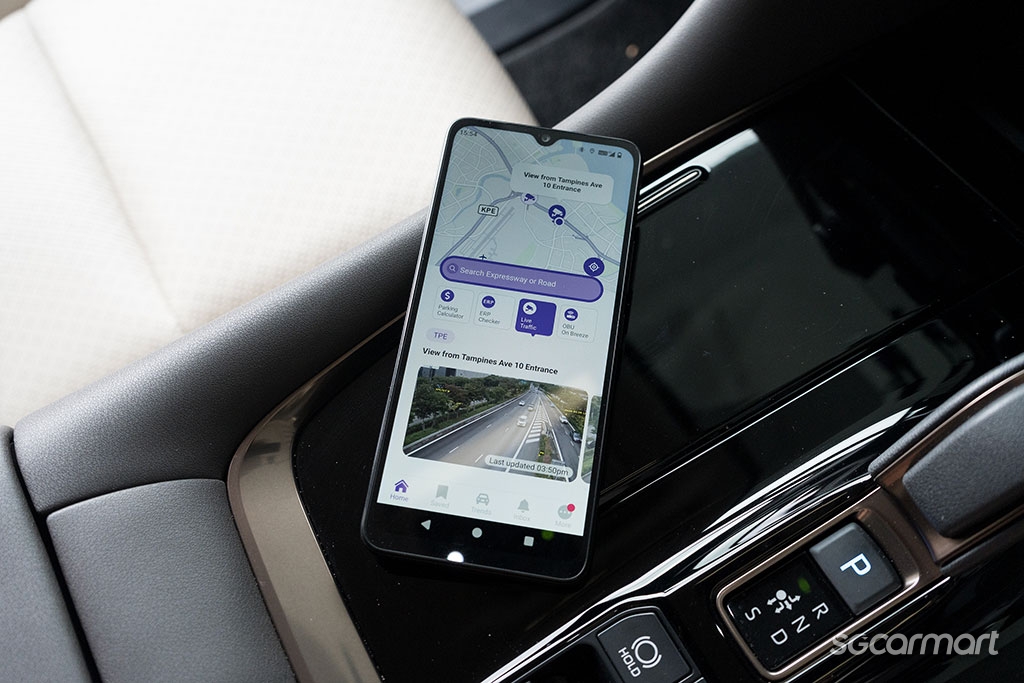
    With Breeze, you can not only check parking prices around your destination, but can also snoop out just how much traffic there is along the way from Singapore's traffic cameras (images of Woodlands Causeway are also available)

    For those not so great at navigating our streets, not only does Breeze offer directions, but can also advise on the availability of parking lots at your entered destination, on top of information on pricing for the lot. And should you find any of these unfavourable, the app will even automatically draw up alternative parking locations, so you always know what your best next options are.

    Even if you're planning a trip in advance, the Breeze app still has plenty to offer.

    You can check if there are any ERP payments that you'll incur on a given route next week via the app, for example. And for those who frequently drive over the causeway, the app also offers cctv footage of traffic conditions at both the first and second link into Malaysia, on top of footage across a host of our island's expressways.

    And you'll be able to look forward to much more besides with the breeze app as well.
    Navigating with the Breeze app is as easy as Google Maps, and the developers at Breeze plan to add in more features, so in the future you will be able to find new food options or places of interest at different districts, for example

    First off, parking vouchers are already offered in the app, which can be redeemed all via the app itself even before you leave your home. What these means is that you won't even need to disable your CEPAS card when you drive out of the parking lot from which you’ve activated the voucher for - any discounts you have will automatically be applied as the parking gantry will already know which OBU identification number to look out for. 

    The developers of the app state that this system could be used in the future to offer dynamic management of the preferred parking location of drivers, so looking for a spot to park up when a popular concert swings into town or when there's large events downtown could become easier in the future.

    And beyond the world of motoring, the app is also working to integrate alternative maps so, for example, users could explore possible food options within a certain region.

    Conclusion: It's currently the best alternative to the OBU display out there, whether you intend to just utilise its navigation features and keep receiving those OBU alerts, or to make use of its vast data of parking prices. Furthermore, it is the only app that doesn't even require you to have a smartphone holder in your car.

    Breeze is available on the Google Play app store here, and on the Apple App Store here.
    Which app will you get?

    Which app to download?

    Don't want to install the display unit of the new OBU system in your car? For those who would rather simply use their smartphone to stream the same display of the unit onto their phone, the LTA ERP 2.0 app is competent. But I'd expect most would rather have Google Maps or Waze running at the foreground of their smartphones, so the ERP 2.0 app only has any worth when it comes to offering warnings about bus lane operation times and speed traps.

    And likewise for the Galactio app. Sign up for automatic top-ups of your CEPAS card and you'll be infinitely better off using Google Maps or Waze to navigate around Singapore.

    Which brings us neatly over to Breeze. With a competent in-built navigation system alongside a suite of features that makes it an appealing option even next to Waze and Google Maps, it's currently the most appealing option of the three here.

    Clarence Seow
    Story by Clarence Seow
    A true epicurean, he has three pleasures: Good food, good sleep, and, of course, fun cars.
    24.4k

    Tags

    new car buying and owning guide obu on board unit erp erp 2.0 obu display unit obu app erp 2.0 app cashcard cepas card

    All Advice Categories

    Car BuyingCar SellingCar OwnershipCar TechnicalCar MaintenanceMiscellaneous

    All Advice Categories

    Car BuyingCar SellingCar OwnershipCar TechnicalCar MaintenanceMiscellaneous

    Related Motor Directory Categories

      Solar Films & TintingPaint ProtectionTyres & RimsSpray PaintingUpholstery - Seats & TopsDecals, Stickers & Number Plates

    Related Motor Directory Categories

      Solar Films & TintingPaint ProtectionTyres & RimsSpray PaintingUpholstery - Seats & TopsDecals, Stickers & Number Plates

    Related Articles

    Is parallel import hesitancy growing among car buyers?

    Is parallel import hesitancy growing among car buyers?

    DENZA Z9 GT First Drive Review

    DENZA Z9 GT First Drive Review

    Hongqi Singapore opens its showroom doors

    Hongqi Singapore opens its showroom doors

    Must-Have Car Accessories Every EV Driver Should Own

    Must-Have Car Accessories Every EV Driver Should Own

    Potential fixes to our COE system

    Potential fixes to our COE system

    Sgcarmart Explores: Bras Basah!

    Sgcarmart Explores: Bras Basah!

    Tesla Model Y L Premium AWD 88kWh Review

    Tesla Model Y L Premium AWD 88kWh Review

    Toyota RAV4 Hybrid Review

    Toyota RAV4 Hybrid Review

    Related Articles

    Is parallel import hesitancy growing among car buyers?

    Is parallel import hesitancy growing among car buyers?

    DENZA Z9 GT First Drive Review

    DENZA Z9 GT First Drive Review

    Hongqi Singapore opens its showroom doors

    Hongqi Singapore opens its showroom doors

    Must-Have Car Accessories Every EV Driver Should Own

    Must-Have Car Accessories Every EV Driver Should Own

    Potential fixes to our COE system

    Potential fixes to our COE system

    Sgcarmart Explores: Bras Basah!

    Sgcarmart Explores: Bras Basah!

    Tesla Model Y L Premium AWD 88kWh Review

    Tesla Model Y L Premium AWD 88kWh Review

    Toyota RAV4 Hybrid Review

    Toyota RAV4 Hybrid Review

    You May Also Like

    Sgcarmart Explores: Bras Basah!

    Sgcarmart Explores: Bras Basah!

    New cars are safer: Opt for one when you can

    New cars are safer: Opt for one when you can

    Maxus MIFA 7 Elite: Going big for the little moments

    Maxus MIFA 7 Elite: Going big for the little moments

    The all new XPENG Mona L03 is one smart coupe SUV

    The all new XPENG Mona L03 is one smart coupe SUV

    Sgcarmart Explores: East Coast Park!

    Sgcarmart Explores: East Coast Park!

    Opinion: Why do we even need green number plates?

    Opinion: Why do we even need green number plates?

    The BYD Sealion 8 seven-seater SUV arrives in Singapore

    The BYD Sealion 8 seven-seater SUV arrives in Singapore

    Must-Have Car Accessories Every EV Driver Should Own

    Must-Have Car Accessories Every EV Driver Should Own

    Hongqi Singapore opens its showroom doors

    Hongqi Singapore opens its showroom doors

    Is parallel import hesitancy growing among car buyers?

    Is parallel import hesitancy growing among car buyers?

    Ferrari 849 Testarossa Spider - with the sky included

    Ferrari 849 Testarossa Spider - with the sky included

    Don't get yourself trapped in your high-tech EV

    Don't get yourself trapped in your high-tech EV

    Mercedes-Benz GLB250+ Review

    Mercedes-Benz GLB250+ Review

    Tesla launches Model Y L in Singapore, first six-seater here

    Tesla launches Model Y L in Singapore, first six-seater here

    A first look at Chery's iCaur V23 and Jaecoo J8 in Singapore

    A first look at Chery's iCaur V23 and Jaecoo J8 in Singapore

    New to driving? Here's how to become a better driver

    New to driving? Here's how to become a better driver

    You May Also Like

    Sgcarmart Explores: Bras Basah!

    Sgcarmart Explores: Bras Basah!

    New cars are safer: Opt for one when you can

    New cars are safer: Opt for one when you can

    Maxus MIFA 7 Elite: Going big for the little moments

    Maxus MIFA 7 Elite: Going big for the little moments

    The all new XPENG Mona L03 is one smart coupe SUV

    The all new XPENG Mona L03 is one smart coupe SUV

    Sgcarmart Explores: East Coast Park!

    Sgcarmart Explores: East Coast Park!

    Opinion: Why do we even need green number plates?

    Opinion: Why do we even need green number plates?

    The BYD Sealion 8 seven-seater SUV arrives in Singapore

    The BYD Sealion 8 seven-seater SUV arrives in Singapore

    Must-Have Car Accessories Every EV Driver Should Own

    Must-Have Car Accessories Every EV Driver Should Own

    Hongqi Singapore opens its showroom doors

    Hongqi Singapore opens its showroom doors

    Is parallel import hesitancy growing among car buyers?

    Is parallel import hesitancy growing among car buyers?

    Ferrari 849 Testarossa Spider - with the sky included

    Ferrari 849 Testarossa Spider - with the sky included

    Don't get yourself trapped in your high-tech EV

    Don't get yourself trapped in your high-tech EV

    Mercedes-Benz GLB250+ Review

    Mercedes-Benz GLB250+ Review

    Tesla launches Model Y L in Singapore, first six-seater here

    Tesla launches Model Y L in Singapore, first six-seater here

    A first look at Chery's iCaur V23 and Jaecoo J8 in Singapore

    A first look at Chery's iCaur V23 and Jaecoo J8 in Singapore

    New to driving? Here's how to become a better driver

    New to driving? Here's how to become a better driver