View page in desktop
|
Report error
  •   Apple app store icon
  • Google play store icon
Terms of Service
|
Privacy Policy
|
PDPA
|
Site Map
©2004-2026 Sgcarmart, Singapore. All rights reserved.
  • Home
  • Car Articles
  • advice
  • advice Listings
  • Car Technical Advice
  • Six car features you (probably) didn't learn about in driving school

    16 Nov 2022

    |

    20,787 views

    You've recently gotten your driving licence, acquired your first car, and have noticed features in it that you've never seen before. Here are six examples of such car features and how to use them properly.


    In driving school, you learnt how to operate a car's basic functions. However, cars today are getting more and more advanced, and the car you just bought may have more features than the ones you practiced on at the driving centre.

    As a new driver, you might be feeling apprehensive about trying these functions. But you shouldn't be, for learning about your car is part of the fun. Here are six features you should definitely try out.

    1. Paddle Shifters
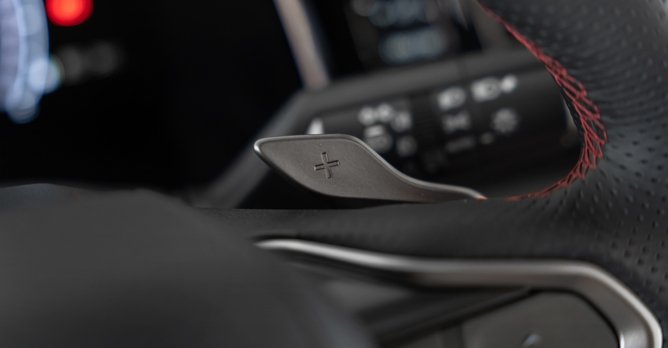
    Paddle shifters come in a variety of shapes and sizes and can be made from various materials, but they all perform the same functions
    Located behind the 9 o'clock 3 o'clock positions, these paddles marked with '-' and '+' symbols tell the gearbox when to shift down or shift up. This lets you enjoy manual control while having an automatic gearbox, and in a sports car, lets you keep the revs up.

    How to use: Pull the left or '-' paddle to downshift, pull on the right or '+' paddle to shift up. Depending on your car model, you may need to slide the gear lever in 'M' first. In some Mercedes models, there is a specific button to press to toggle Manual mode.

    Don't worry about damaging the gearbox in manual mode. The software that controls it will not allow you to suddenly downshift from eighth gear to first gear and vice-versa.

    2. Auto Hold

    The Auto Hold feature here is the button on the right marked by an encircled 'A'
    The aptly named Auto Hold function stops the car from moving after you have come to a stop and given the brake pedal a firm press. The car will remain stationary without you needing to keep your foot on the pedal.

    How to use: Different carmakers use different buttons. They can be labeled 'Auto Hold' or even 'Auto H'. The button is usually located near the toggle for the electronic parking brake. When it's on, you activate Auto Hold by giving the brake pedal a firm press after your car has come to a halt.

    This function should be used with care, though. Don't solely rely on it to hold the car in position and/or prevent it from rolling forwards or backwards when on a slope. Auto Hold helps, but never replaces the driver.

    3. Cruise Control

    Cruise Control in some cars can be offered with a version of lane keep assist or lane centering assist, which helps the driver keep the car centred
    This makes driving on expressway stretches more convenient by maintaining the speed set by the driver. The function will accelerate the car on uphill stretches, and try to prevent the car from going too far past the set speed on downhill portions.

    How to use: When you reach your desired speed, press the 'Cruise' button, followed by the toggle marked 'Set'. The car will now try to maintain this speed. Press the '+' button to increase speed or the '-' button to slow down.

    Depending on your car, the '+' and '-' buttons may increase or decrease your speed in 1km/h or 2km/h increments. To be sure, consult your owner's manual.

    Stepping on the brake pedal overrides Cruise Control but does not turn it off. To re-activate, press the 'Res' or 'Resume' button, which tells the car to return to the last set speed. To turn off the function, press 'Cruise' or 'Off'.

    4. Adaptive Cruise Control

    Adaptive Cruise Control lets you set the distance to the car in front, but the system's pre-set parameters will ensure you don't tail-gate others
    A more advanced version of cruise control, it varies your car's speed and following distance in relation to the vehicle in front of yours, while taking into account your set speed and following distance.

    How to use: Activate it like you would cruise control, then set your preferred following distance. Pressing the '+' and '-' buttons may increase/decrease your speed in increments of 5km/h or 10km/h, depending on car model.

    Although more advanced than cruise control, you cannot totally rely on adaptive cruise control to stop your car from hitting the one in front, especially if another vehicle suddenly cuts in front of yours. The onus is still on you to prevent mishaps.

    5. Driving Modes

    Driving modes change how your car behaves, but they cannot change the engine's output or make it faster than it already is
    Many cars today offer the drivers the option of selecting a drive mode. In most models, the drive mode affects how the engine and gearbox respond to inputs.

    How to use: Find the 'Mode' switch that's usually located near the gearshift lever to see and toggle through the available modes. These typically consist of Eco, Normal, Sport and in some cars, Sport+.

    'Eco' helps improve fuel economy by reducing the responsiveness of the accelerator pedal and engine, while telling the gearbox to shift up to a higher gear as soon as it is optimal.

    'Sport' and 'Sport+' do the opposite. These settings increase the sensitivity and responsiveness of the engine, gearbox and accelerator pedal to make the car feel livelier. The transmission tends to hold on to each ratio a bit longer to keep the revs high for stronger acceleration.

    6. Park Assist

    The Park Assist button (second from left) is sometimes marked by a 'P' and a steering wheel
    This aptly named function can help you get in and out of parking spaces, especially parallel ones that can be tricky for drivers of larger vehicles such as SUVs.

    How to use: While searching for a parking space, press the button marked with a 'P' and the graphic of a cone. Then, use the indicator to tell the system which side to search for a parking space.

    When a space is detected and you wish to park there, a message on the dashboard will prompt you to shift into 'R'. In basic Park Assist systems, the car will only turn the steering wheel - the driver has to keep his foot on the brake pedal to moderate the speed.

    Follow the on-screen directions, which will prompt you to shift back into 'D' so the system can straighten/adjust the vehicle's position. And remember, even if the system in your car is advanced enough to perform this entire process, you as the driver must always be ready to intervene as needed.

    Want to learn more about car technologies? Check out these stories

    Most affordable cars that come with auto-park as standard

    Artificial intelligence and augmented reality will be part of the UX in future cars

    These old Japanese cars from the 80s and 90s feature modern tech you see today
    Jeremy Chua
    Jeremy Chua
    Jeremy loves fast cars, the sweet smell of petrol and the burbling, erotic noises from a V8.
    Photos by Editorial Team
    24.4k

    Tags

    car advice advice car features car functions safety features paddle shifters auto hold cruise control adaptive cruise control driving modes park assist parking assist

    AllReviewsNewsAdviceFeaturesVideos
    • Home
    • Car Articles
    • advice
    • advice Listings
    • Car Technical Advice

    Six car features you (probably) didn't learn about in driving school

    16 Nov 2022

    |

    20,787 views

    You've recently gotten your driving licence, acquired your first car, and have noticed features in it that you've never seen before. Here are six examples of such car features and how to use them properly.


    In driving school, you learnt how to operate a car's basic functions. However, cars today are getting more and more advanced, and the car you just bought may have more features than the ones you practiced on at the driving centre.

    As a new driver, you might be feeling apprehensive about trying these functions. But you shouldn't be, for learning about your car is part of the fun. Here are six features you should definitely try out.

    1. Paddle Shifters

    Paddle shifters come in a variety of shapes and sizes and can be made from various materials, but they all perform the same functions
    Located behind the 9 o'clock 3 o'clock positions, these paddles marked with '-' and '+' symbols tell the gearbox when to shift down or shift up. This lets you enjoy manual control while having an automatic gearbox, and in a sports car, lets you keep the revs up.

    How to use: Pull the left or '-' paddle to downshift, pull on the right or '+' paddle to shift up. Depending on your car model, you may need to slide the gear lever in 'M' first. In some Mercedes models, there is a specific button to press to toggle Manual mode.

    Don't worry about damaging the gearbox in manual mode. The software that controls it will not allow you to suddenly downshift from eighth gear to first gear and vice-versa.

    2. Auto Hold
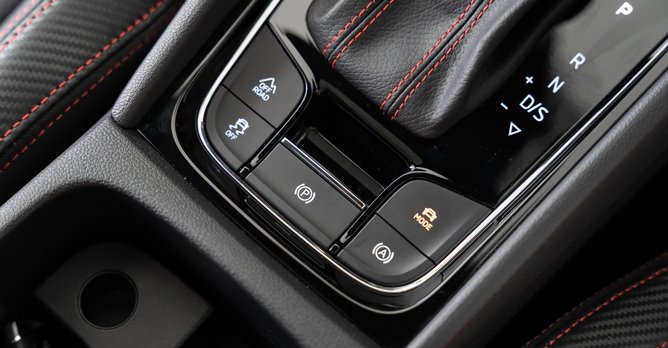
    The Auto Hold feature here is the button on the right marked by an encircled 'A'
    The aptly named Auto Hold function stops the car from moving after you have come to a stop and given the brake pedal a firm press. The car will remain stationary without you needing to keep your foot on the pedal.

    How to use: Different carmakers use different buttons. They can be labeled 'Auto Hold' or even 'Auto H'. The button is usually located near the toggle for the electronic parking brake. When it's on, you activate Auto Hold by giving the brake pedal a firm press after your car has come to a halt.

    This function should be used with care, though. Don't solely rely on it to hold the car in position and/or prevent it from rolling forwards or backwards when on a slope. Auto Hold helps, but never replaces the driver.

    3. Cruise Control
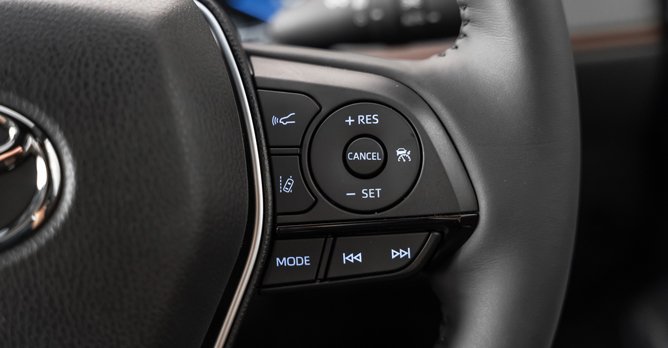
    Cruise Control in some cars can be offered with a version of lane keep assist or lane centering assist, which helps the driver keep the car centred
    This makes driving on expressway stretches more convenient by maintaining the speed set by the driver. The function will accelerate the car on uphill stretches, and try to prevent the car from going too far past the set speed on downhill portions.

    How to use: When you reach your desired speed, press the 'Cruise' button, followed by the toggle marked 'Set'. The car will now try to maintain this speed. Press the '+' button to increase speed or the '-' button to slow down.

    Depending on your car, the '+' and '-' buttons may increase or decrease your speed in 1km/h or 2km/h increments. To be sure, consult your owner's manual.

    Stepping on the brake pedal overrides Cruise Control but does not turn it off. To re-activate, press the 'Res' or 'Resume' button, which tells the car to return to the last set speed. To turn off the function, press 'Cruise' or 'Off'.

    4. Adaptive Cruise Control
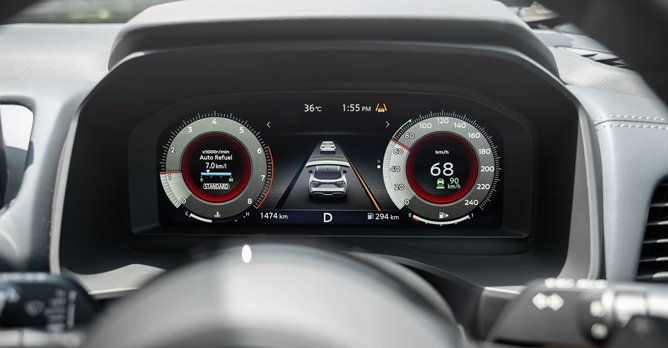
    Adaptive Cruise Control lets you set the distance to the car in front, but the system's pre-set parameters will ensure you don't tail-gate others
    A more advanced version of cruise control, it varies your car's speed and following distance in relation to the vehicle in front of yours, while taking into account your set speed and following distance.

    How to use: Activate it like you would cruise control, then set your preferred following distance. Pressing the '+' and '-' buttons may increase/decrease your speed in increments of 5km/h or 10km/h, depending on car model.

    Although more advanced than cruise control, you cannot totally rely on adaptive cruise control to stop your car from hitting the one in front, especially if another vehicle suddenly cuts in front of yours. The onus is still on you to prevent mishaps.

    5. Driving Modes
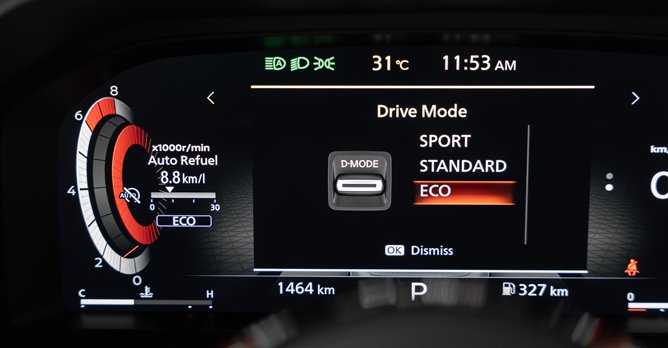
    Driving modes change how your car behaves, but they cannot change the engine's output or make it faster than it already is
    Many cars today offer the drivers the option of selecting a drive mode. In most models, the drive mode affects how the engine and gearbox respond to inputs.

    How to use: Find the 'Mode' switch that's usually located near the gearshift lever to see and toggle through the available modes. These typically consist of Eco, Normal, Sport and in some cars, Sport+.

    'Eco' helps improve fuel economy by reducing the responsiveness of the accelerator pedal and engine, while telling the gearbox to shift up to a higher gear as soon as it is optimal.

    'Sport' and 'Sport+' do the opposite. These settings increase the sensitivity and responsiveness of the engine, gearbox and accelerator pedal to make the car feel livelier. The transmission tends to hold on to each ratio a bit longer to keep the revs high for stronger acceleration.

    6. Park Assist
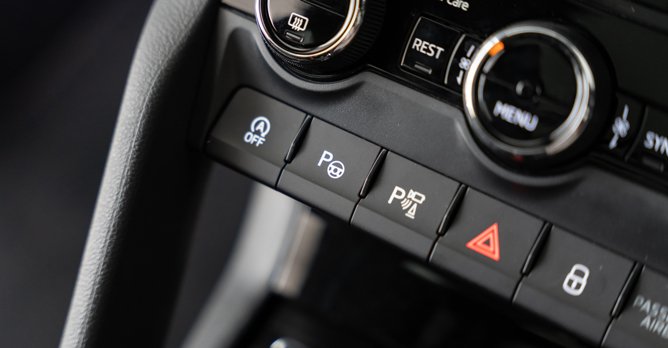
    The Park Assist button (second from left) is sometimes marked by a 'P' and a steering wheel
    This aptly named function can help you get in and out of parking spaces, especially parallel ones that can be tricky for drivers of larger vehicles such as SUVs.

    How to use: While searching for a parking space, press the button marked with a 'P' and the graphic of a cone. Then, use the indicator to tell the system which side to search for a parking space.

    When a space is detected and you wish to park there, a message on the dashboard will prompt you to shift into 'R'. In basic Park Assist systems, the car will only turn the steering wheel - the driver has to keep his foot on the brake pedal to moderate the speed.

    Follow the on-screen directions, which will prompt you to shift back into 'D' so the system can straighten/adjust the vehicle's position. And remember, even if the system in your car is advanced enough to perform this entire process, you as the driver must always be ready to intervene as needed.

    Want to learn more about car technologies? Check out these stories

    Most affordable cars that come with auto-park as standard

    Artificial intelligence and augmented reality will be part of the UX in future cars

    These old Japanese cars from the 80s and 90s feature modern tech you see today

    Jeremy Chua
    Jeremy Chua
    Jeremy loves fast cars, the sweet smell of petrol and the burbling, erotic noises from a V8.
    Photos by Editorial Team
    24.4k

    Tags

    car advice advice car features car functions safety features paddle shifters auto hold cruise control adaptive cruise control driving modes park assist parking assist

    All Advice Categories

    Car BuyingCar SellingCar OwnershipCar TechnicalCar MaintenanceMiscellaneous

    All Advice Categories

    Car BuyingCar SellingCar OwnershipCar TechnicalCar MaintenanceMiscellaneous

    Related Motor Directory Categories

      Power EnhancementBodykits & PartsRacing & Motorsports EquipmentAccident Repair & ClaimsHandling & Safety

    Related Motor Directory Categories

      Power EnhancementBodykits & PartsRacing & Motorsports EquipmentAccident Repair & ClaimsHandling & Safety

    You May Also Like

    We try out roadside parking with the new OBU!

    We try out roadside parking with the new OBU!

    New cars are safer: Opt for one when you can

    New cars are safer: Opt for one when you can

    EV NEXT: Peace of mind with battery SOH certification

    EV NEXT: Peace of mind with battery SOH certification

    Multi-Pathway approach: Toyota was always right

    Multi-Pathway approach: Toyota was always right

    Mazda 6e Fastback GT Electric review

    Mazda 6e Fastback GT Electric review

    Don't get yourself trapped in your high-tech EV

    Don't get yourself trapped in your high-tech EV

    Big Test: Which brand makes the best hybrid?

    Big Test: Which brand makes the best hybrid?

    Is parallel import hesitancy growing among car buyers?

    Is parallel import hesitancy growing among car buyers?

    The rise of PHEVs: A closer look at the numbers

    The rise of PHEVs: A closer look at the numbers

    Sgcarmart Explores: Bras Basah!

    Sgcarmart Explores: Bras Basah!

    Opinion: Is it time for a change to our road traffic laws?

    Opinion: Is it time for a change to our road traffic laws?

    A first look at Chery's iCaur V23 and Jaecoo J8 in Singapore

    A first look at Chery's iCaur V23 and Jaecoo J8 in Singapore

    Hongqi Singapore opens its showroom doors

    Hongqi Singapore opens its showroom doors

    The BYD Sealion 8 seven-seater SUV arrives in Singapore

    The BYD Sealion 8 seven-seater SUV arrives in Singapore

    iCaur V23 100kW Review

    iCaur V23 100kW Review

    7 things we learnt about the Zeekr 7GT

    7 things we learnt about the Zeekr 7GT

    You May Also Like

    We try out roadside parking with the new OBU!

    We try out roadside parking with the new OBU!

    New cars are safer: Opt for one when you can

    New cars are safer: Opt for one when you can

    EV NEXT: Peace of mind with battery SOH certification

    EV NEXT: Peace of mind with battery SOH certification

    Multi-Pathway approach: Toyota was always right

    Multi-Pathway approach: Toyota was always right

    Mazda 6e Fastback GT Electric review

    Mazda 6e Fastback GT Electric review

    Don't get yourself trapped in your high-tech EV

    Don't get yourself trapped in your high-tech EV

    Big Test: Which brand makes the best hybrid?

    Big Test: Which brand makes the best hybrid?

    Is parallel import hesitancy growing among car buyers?

    Is parallel import hesitancy growing among car buyers?

    The rise of PHEVs: A closer look at the numbers

    The rise of PHEVs: A closer look at the numbers

    Sgcarmart Explores: Bras Basah!

    Sgcarmart Explores: Bras Basah!

    Opinion: Is it time for a change to our road traffic laws?

    Opinion: Is it time for a change to our road traffic laws?

    A first look at Chery's iCaur V23 and Jaecoo J8 in Singapore

    A first look at Chery's iCaur V23 and Jaecoo J8 in Singapore

    Hongqi Singapore opens its showroom doors

    Hongqi Singapore opens its showroom doors

    The BYD Sealion 8 seven-seater SUV arrives in Singapore

    The BYD Sealion 8 seven-seater SUV arrives in Singapore

    iCaur V23 100kW Review

    iCaur V23 100kW Review

    7 things we learnt about the Zeekr 7GT

    7 things we learnt about the Zeekr 7GT

    Related Articles

    New to driving? Here's how to become a better driver

    New to driving? Here's how to become a better driver

    10-Year COE Survival Kit: Essential Checklist

    10-Year COE Survival Kit: Essential Checklist

    Value-for-Money Servicing Packages for Your Car

    Value-for-Money Servicing Packages for Your Car

    Road Trip Checklist Before You Hit the Road

    Road Trip Checklist Before You Hit the Road

    Engine Oil Options to Suit Your Driving Needs

    Engine Oil Options to Suit Your Driving Needs

    Related Articles

    New to driving? Here's how to become a better driver

    New to driving? Here's how to become a better driver

    10-Year COE Survival Kit: Essential Checklist

    10-Year COE Survival Kit: Essential Checklist

    Value-for-Money Servicing Packages for Your Car

    Value-for-Money Servicing Packages for Your Car

    Road Trip Checklist Before You Hit the Road

    Road Trip Checklist Before You Hit the Road

    Engine Oil Options to Suit Your Driving Needs

    Engine Oil Options to Suit Your Driving Needs